
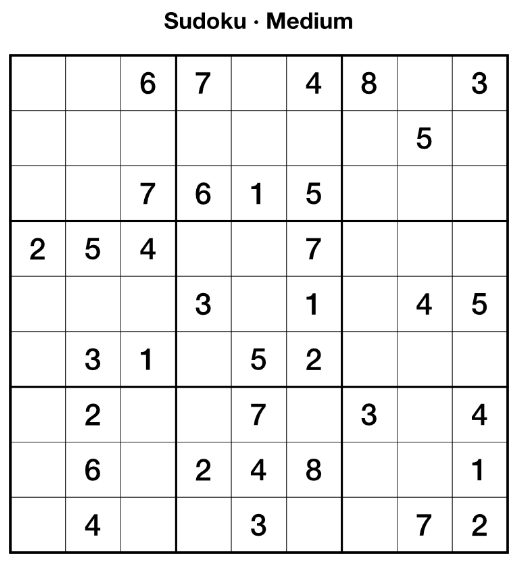
Generates valid Sudoku puzzles with unique solutions.
Installation
-
Download the zip file and unzip it.
-
Run the script in one of two ways:
a) Run directly — Open the Script Editor panel
(Window > Scripting > Script Editor), paste the contents
of sudoku-generator.js into the editor, and press Run.
b) Save to Script Library first — Follow step (a) above, then click Save As… to save the script to the Script Library. Open the Script Library panel (Window > Scripting > Script Library) and click the saved script once to run it.
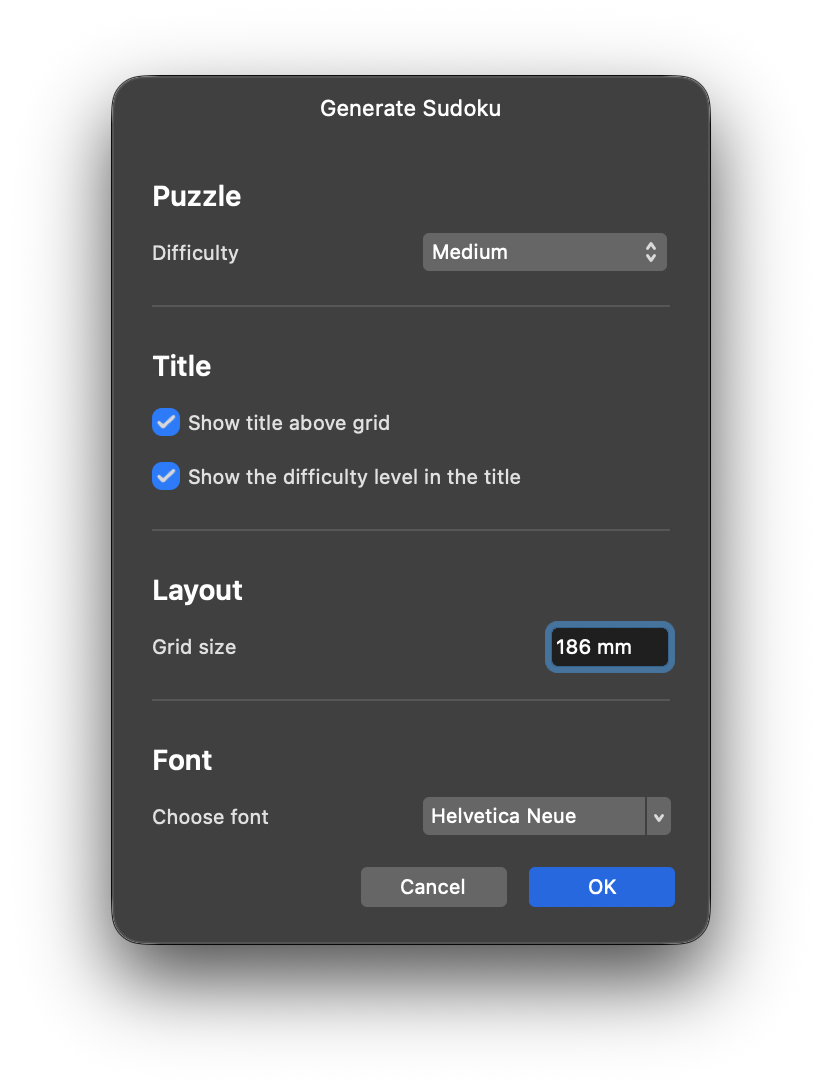
Purpose
Generates a Sudoku puzzle and draws it onto the current document. If no document is open, a new A4 portrait document at 300 dpi is created automatically.
How it works
The script uses a standard backtracking algorithm to generate a valid complete grid, then digs out cells one at a time while verifying that the puzzle still has exactly one solution. This guarantees every generated puzzle is solvable and has a unique answer — not just random numbers.
Features
- 4 difficulty levels — Easy (36 empty), Medium (46 empty), Hard (52 empty), Expert (58 empty)
- Adjustable grid size — from 40mm up to whatever fits the current page (capped at 500mm); opens at 60% of that maximum, leaving room to grow or shrink. Type a value directly or drag the field’s built-in slider, both live-previewed
- Independent title options — “Show title above grid” (
Sudoku) and “Show the difficulty level in the title” (<Difficulty>) are separate checkboxes. Either can be used alone; with both on, they combine intoSudoku · <Difficulty> - Title on a separate layer — An optional third checkbox keeps the title out of the puzzle’s named container — named
Sudoku titlein the Layers panel — so it can be repositioned, restyled, or deleted independently of the grid - Auto-document — Creates an A4 300 dpi document if none is open
- Grouped output — All shapes and text are placed inside a named container (
sudoku-<Difficulty>, e.g.sudoku-Easy), so the whole puzzle can be selected, moved, or deleted as one object - Live preview — The puzzle redraws on the canvas as soon as the dialog opens, and again as difficulty, title, grid size, or font are changed, before OK is clicked
- Scaled strokes — Line weight scales with grid size so borders stay proportional
Usage tips
- Clue numbers are individually editable art-text nodes — double-click any number to change it after placement.
- Grid size should match your page layout; larger grids need more page space, especially with the title enabled.
- The script places all puzzle elements inside a named container
(
sudoku-<Difficulty>) so the whole puzzle moves as one object by default.
Known limitations
Each cell, clue, and the title is still an individually editable Affinity object inside that container. Moving or resizing cells individually (after entering the group) can break the grid alignment.
Generating a puzzle takes two undo steps (container creation, then content) rather than one — or three with “Title on a separate layer” checked, since the title is then added as its own, separately-committed node after the grouped content.
The puzzle itself only regenerates when difficulty changes — resizing, retitling, or re-fonting redraws the same cached puzzle rather than dealing a new one, so adjusting other settings doesn’t scramble the clue numbers mid-edit.
The font picker fires no live-preview events at all on this SDK, so font changes are previewed via a background poll of the picker’s value instead of an event handler. The font actually applied is always read fresh at OK-time, so the committed puzzle is never wrong even if a preview tick were missed.
The “Grid size” field’s maximum is fixed once when the dialog opens, calculated as if the title were shown. If both title checkboxes end up off, the grid could in theory fit a touch larger than the field allows — a minor, one-directional gap rather than a layout bug.
Changelog
2.0.0 - Major version bump marking a substantial redesign since 1.0.5: the dialog is now fully interactive (live on-canvas preview for every control, including grid size, title, and font, before OK is clicked), the output is grouped into a named container per difficulty, the title’s content and placement are independently configurable (two checkboxes for wording, a third to put it on its own layer), and the grid-size field is bounded to what the page can actually fit with a built-in slider.
1.0.20 - Fixed “Title on a separate layer” not actually greying out when neither title checkbox is on; a workaround hide/show cycle now forces the control to repaint correctly.
1.0.19 - The separated title layer is now explicitly named Sudoku title instead of relying on Affinity’s auto-naming, which would otherwise name it just Sudoku or similar — easy to confuse with the puzzle’s own sudoku-<Difficulty> group.
1.0.18 - “Title on a separate layer” is now greyed out unless either “Show title above grid” or “Show the difficulty level in the title” is checked — it had no effect with neither on.
1.0.17 - Added “Title on a separate layer” to the Title section — a third checkbox that, when checked, keeps the title out of the puzzle’s named container on OK, leaving it as its own ungrouped node instead. Costs one more undo step when checked; unchecked (the default), behavior is unchanged.
1.0.16 - The grid now opens at 60% of the page-fit maximum instead of ~95%, leaving clear headroom for the grid-size slider to do something meaningful in either direction.
1.0.15 - Fixed the “Grid size” field allowing values beyond what the page can actually fit — it was bounded by a constant 40–500mm regardless of document size. The field’s maximum is now capped to what the current page can fit, so the slider’s range always matches what the grid can really reach.
1.0.14 - Fixed the title-to-grid gap not shrinking with the grid: it was clamped to a fixed 10mm minimum, which dominated the proportional scaling for most practical sizes. The floor is now 3mm, so the gap scales proportionally across the whole normal range.
1.0.13 - The “Grid size” field now shows a built-in popup slider (click its icon and drag) alongside typing a value directly, live-previewed either way.
1.0.12 - Fixed “Show the difficulty level in the title”: it was wrongly gated behind “Show title above grid”, so it silently did nothing with that checkbox off. The two are now independent — either alone shows just its own text, and both together combine into Sudoku · <Difficulty>.
1.0.11 - Fixed a leftover-preview bug: cancelling the dialog right after changing the font could leave the previewed puzzle on the canvas instead of clearing it. The font poll now checks the dialog’s own running state before acting, so a trailing tick after close is always a no-op.
1.0.10 - Added a “Title” section to the dialog with two checkboxes: “Show title above grid” and a new “Show the difficulty level in the title”, so the difficulty can be left out of the title independently of showing the title itself. Also live-previewed.
1.0.9 - Font changes now preview live too, via a background poll of the font picker’s value (the picker fires no change events on this SDK).
1.0.8 - The dialog now previews the puzzle live on the canvas as difficulty, title, grid size, or font are changed — before clicking OK. The puzzle itself only regenerates when difficulty changes, so the preview doesn’t scramble the clue numbers while resizing.
1.0.7 - The dialog’s “Grid size” field now pre-fills 5mm larger than the previous auto-calculated default.
1.0.6 - Generated puzzles are now grouped into a named container (sudoku-<Difficulty>, e.g. sudoku-Easy) so the whole puzzle can be selected, moved, or deleted as one object. Costs a second undo step (container creation, then content).
1.0.5 - The font picker now opens pre-selected with the auto-detected default (bold/semibold Helvetica Neue or similar) instead of appearing blank, via the picker’s setFont(). Still fully overridable before clicking OK.
1.0.4 - Added an optional font picker to the dialog. Leave it blank to keep auto-detecting a font as before; auto-detect and a family-only pick (no specific style chosen) now bias toward bold/semibold instead of regular, since regular rendered too light for clue numbers. Picking an exact style in the picker (e.g. “Helvetica Neue Bold”) still honors that exact choice.
1.0.3 - Fixed “Font creation failed: INVALID_ARGS” — Font.create() always throws this error in Affinity’s SDK, on every system, regardless of which fonts are installed; it was never a missing-font problem. Clue numbers and the title are now resolved via FontFamily lookup instead, so the preferred font is actually applied rather than silently falling back to the default. Also fixed a second, independent bug directly behind it that fully blocked the script: positioning the clue numbers/title relied on reading back newly-added nodes before the add command had actually been executed, which this SDK doesn’t support. Clue numbers and the title are now measured via a throwaway preview pass and created already centred in the single final command — puzzle generation still commits as one undo step.
1.0.2 - CONFIG object; single undo; try/catch error handling; font error logged; toReversed; modern JS
1.0.1 - Stroke weight now scales with grid size
1.0.0 - Initial version