
Barcode Generator
Print-production barcode studio for EAN-13, ISBN, ISSN, UPC-A, and EAN-8, with price add-ons and live on-canvas preview.
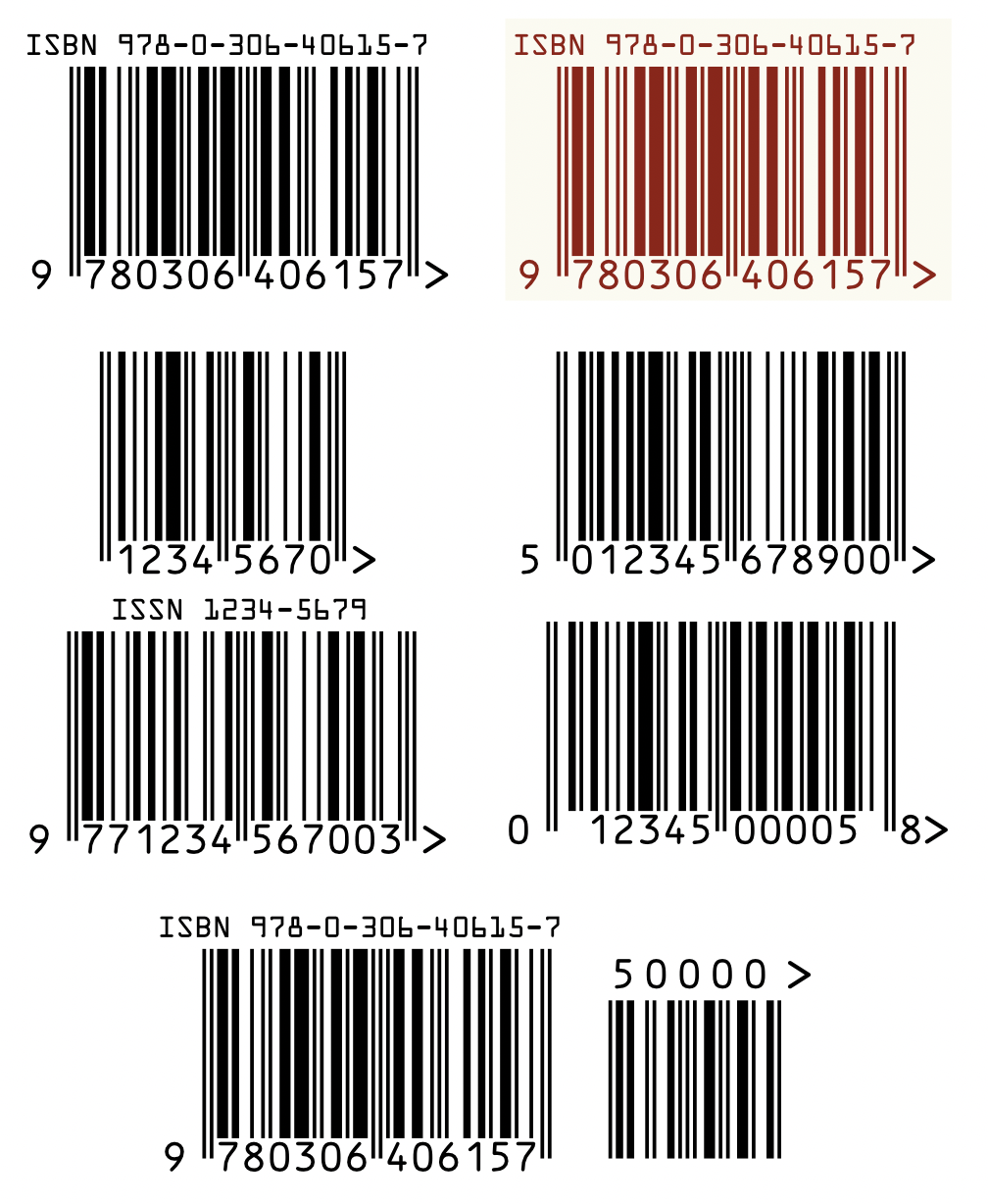
Print-production barcode studio for Affinity: EAN-13, ISBN, ISSN, UPC-A, and EAN-8, plus EAN-2/EAN-5 price add-ons, rendered as font-independent vector curves with live on-canvas preview.
Installation
-
Download the zip file and unzip it.
-
Run the script in one of two ways:
a) Run directly — Open the Script Editor panel (Window > Scripting > Script Editor), paste the contents of
barcode-generator.jsinto the editor, and press Run.b) Save to Script Library first — Follow step (a) above, then click Save As… to save the script to the Script Library. Open the Script Library panel (Window > Scripting > Script Library) and click the saved script once to run it.
Purpose
Generates retail and periodical barcodes natively inside Affinity as a single named grouped vector node. Human-readable digits and the closing > marker are reproduced as exact vector outlines, so there is no font dependency and output prints identically on any machine. The same renderer is shared by preview and commit, so what you see while editing is what gets placed.
Out of scope: Code 128, QR codes, other non-retail symbologies, and ISMN.
Supported formats
- ISBN for books — Accepts ISBN-10, 12-digit 978/979 input, or ISBN-13; computes or verifies the check digit. Optional
ISBN …top line, enabled by default. - EAN-13 — Accepts 12 or 13 digits; computes or verifies the check digit.
- EAN-8 — Accepts 7 or 8 digits; computes or verifies the check digit.
- UPC-A — Accepts 11 or 12 digits; computes or verifies the check digit.
- ISSN for periodicals — Accepts a 7-digit root plus check character; embeds the periodical as EAN-13. The
ISSN …top line is always shown. - EAN-2/EAN-5 add-ons — Optional 2- or 5-digit price or issue supplement drawn beside the main symbol.
Hyphens and spaces are ignored during validation. Valid ISBN-10 input is converted to ISBN-13 after its own check passes.
Dialog walkthrough
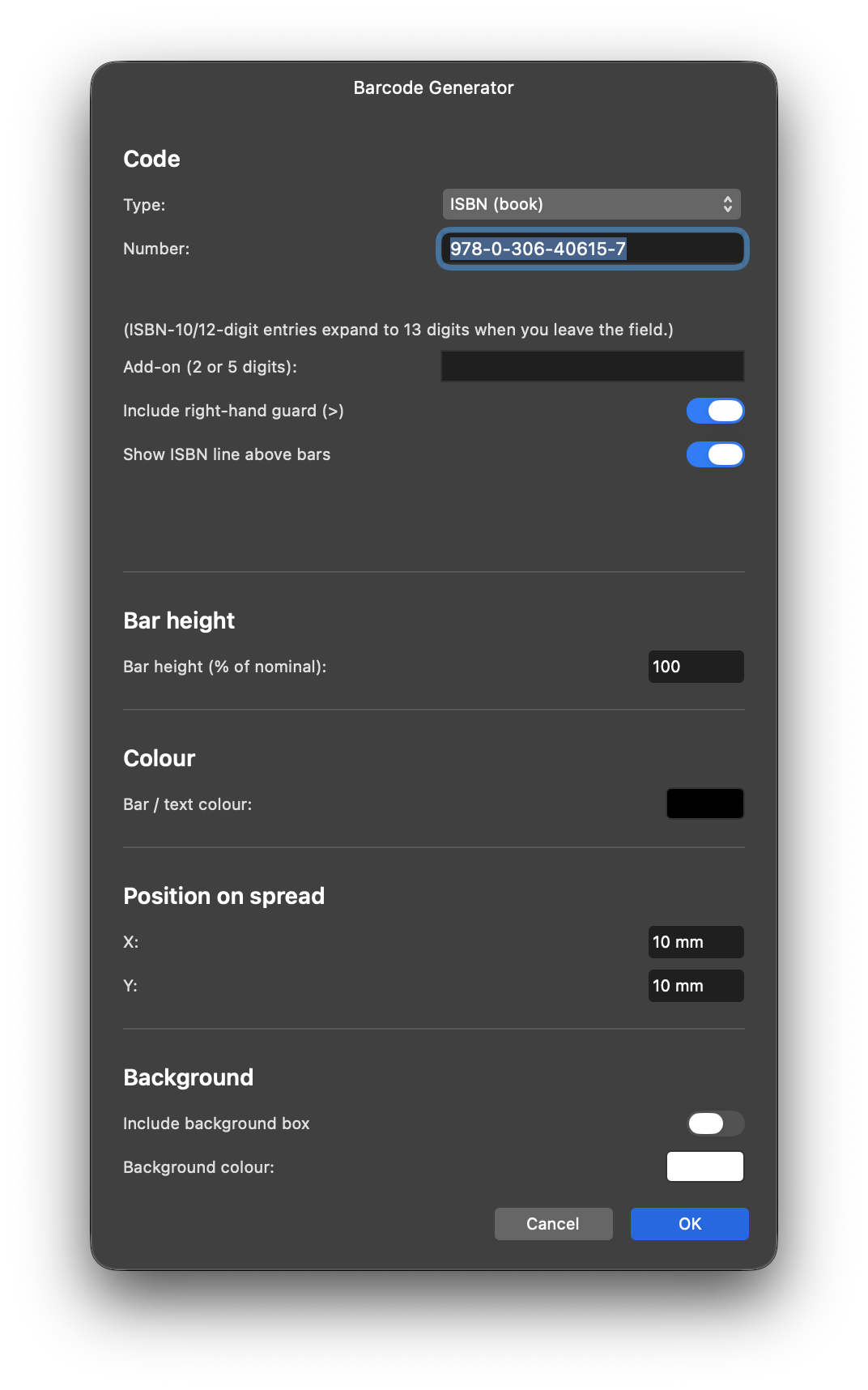
Code
- Type — Selects the barcode symbology. Changing type fills the number field with a valid sample unless you have already typed your own input.
- Number — Enter or paste the barcode number. Complete ISBN-10 or 12-digit 978/979 input expands to 13 digits when you leave the field.
- Add-on — Optional 2- or 5-digit supplement. Incomplete add-on input affects only the add-on preview; the main symbol remains rendered.
- Right-hand guard — Toggles the quiet-zone
>mark. Enabled by default and supported by all types. - ISBN top line — Toggles the eye-legible
ISBN …label. Enabled by default for ISBN and automatically disabled for other types. ISSN always retains its top line. - Status line — Shows live validation feedback. A blank status line means the current input validates or is still being typed.
Bar height
Bar widths always remain at nominal print size. The percentage control scales bar height only, truncating from the top while keeping the bottoms anchored. Human-readable digits and labels remain nominal.
Colour
Selects the bar and text colour. Colours repaint when the picker closes; the committed barcode is always correct.
Position
Sets the barcode X/Y position in millimetres. Moves repaint live, and the committed group can be dragged normally afterward.
Background
Optionally draws a filled box behind the barcode, sized to the visible content. A white background on a white page is invisible by definition, so choose another colour to verify the setting.
Live preview
The barcode renders live on the spread while the dialog remains open. Valid input, toggles, height, position, background, and colour changes repaint immediately. Invalid input clears the preview and explains why in the status line. Cancelling leaves no residue. Pressing OK commits the named grouped container and selects it.
Output anatomy
- Named container identifying the barcode type and number, with add-on information when present.
- Bars at nominal module widths.
- Human-readable digits below the bars.
- Optional ISBN label or mandatory ISSN label above the bars.
- Quiet-zone guard marking the protected right margin.
- Optional add-on block with price digits aligned to the barcode structure.
ISBN hyphenation and network access
Proper ISBN hyphenation uses live ISBN-range data when scripting network access is available. Offline, blocked, or out-of-coverage input falls back silently to a standard numeric split. Manually hyphenated ISBN-13 input is preserved on the top label. All barcode generation works without network access; only hyphenation falls back.
Troubleshooting
- Empty number field: enter a number or select a type sample.
- Incorrect check digit: correct the final digit using the expected value shown.
- Invalid ISBN length or prefix: use 10, 12, or 13 digits, with ISBN-13 starting with 978 or 979.
- Invalid ISSN root: enter seven digits plus the check character.
- Incomplete add-on: complete or clear the 2- or 5-digit supplement.
- Cleared preview: read the status line and continue typing or correct the input.
- Invisible background: choose a non-white background colour to verify it.
- Colour not previewing during dragging: close the picker or press OK.
- Old fill-descriptor error: re-paste the current script version.
FAQ
- Books use ISBN, usually with a five-digit price add-on for US covers.
- Periodicals use ISSN, usually with a two-digit issue add-on.
- General merchandise uses EAN-13.
- North American legacy retail uses UPC-A.
- ISMN is not included because its renderer was incomplete.
- Code 128 and QR codes are outside this script’s retail/periodical scope.
- EAN-8 add-ons are a convenience extension; verify acceptance with your printer or retailer.
Requirements
- Affinity by Canva 3.3.
- An open document for barcode placement.
- Optional scripting network access for live ISBN hyphenation.
- No fonts or external dependencies.
Known limitations
- Glyph outlines are embedded directly, so no system font is required.
- Two-digit EAN-8 add-ons are not defined by symbology standards, although the script renders them on request.
- Colour pickers do not emit live dialog events on current builds; colours apply at picker close or commit.
- Commit uses two undo steps for container and content.
Changelog
1.1.19 - Code-quality pass: non-digit input (e.g. a stray letter) in the “no check digit supplied” ISBN/EAN-13/EAN-8/UPC-A fields now fails with a clear message instead of corrupting the checksum and crashing later; ISSN input now validates its own check character instead of silently discarding it; the script’s top-level run is wrapped in try/catch with console logging for field debugging; dialog defaults consolidated into a CONFIG block; duplicate add-on validation logic merged into one function. No user-facing behaviour changes for valid input.
1.1.18 - Corrected add-on digit placement against the measured barcode reference.
1.1.17 - Centered add-on digits over encoded bar ink and absorbed slot-map drift.
1.1.16 - Used human-readable sans shapes for add-on text with an exact shared baseline.
1.1.15 - Made half-typed add-ons lenient in preview while retaining strict OK-time validation.
1.1.14 - Added an optional ISBN top-line switch while retaining the mandatory ISSN top line.
1.1.13 - Made add-on height track the main-bar percentage with bottoms pinned.
1.1.12 - Aligned add-on bar bottoms with main guard-bar bottoms.
1.1.11 - Shared the price digits’ baseline for the guard after an add-on.
1.1.10 - Raised the guard after an add-on near the bar tops.
1.1.9 - Moved the guard past the add-on block and added guard support to EAN-8 and UPC-A.
1.1.8 - Fixed add-on digit placement and improved add-on error reporting.
1.1.7 - Centered short top labels over the bar block.
1.1.6 - Added roomier background-box breathing space.
1.1.5 - Made the background box track bar-height truncation.
1.1.4 - Made preview colour handling read picker colours correctly.
1.1.3 - Improved preview command behavior and colour-commit handling.
1.1.2 - Temporary instrumented probe build.
1.1.1 - Expanded preview trigger coverage and fixed colour-handler wiring.
1.1.0 - Introduced shared live preview and commit rendering.
1.0.7 - Fixed clipped dialog text and widened the dialog.
1.0.6 - Improved error glyph and validation messaging.
1.0.5 - Fixed repeat-paste evaluation and auto-expansion messaging.
1.0.4 - Added single-dialog live ISBN feedback and mid-correction protection.
1.0.3 - Normalized ISBN input through an OK-and-reshow flow.
1.0.2 - Added live ISBN-10/12 expansion in the number field.
1.0.1 - Added per-type samples, fixed fill arguments, and removed the ISMN entry.
1.0.0 - Initial version.